Wednesday, January 17, 2024

14 Effortless Steps for an exceptional SEO-Optimized Content


Writing an engaging and effective blog post requires careful planning and consideration. In this article, we will explore 14 key points to help you create a blog post that is both easy to understand and optimized for search engines. By following these steps, you can ensure that your content resonates with your target audience, ranks well in search results, and encourages readers to take action.


Writing an engaging and effective blog post requires careful planning and consideration. In this article, we will explore 14 key points to help you create a blog post that is both easy to understand and optimized for search engines. By following these steps, you can ensure that your content resonates with your target audience, ranks well in search results, and encourages readers to take action.


  • Clarify Your Objective:

Before diving into writing, clearly define the purpose of your blog post. Are you aiming to inform, entertain, persuade, or educate? Having a clear objective will guide your content creation process and keep your writing focused and concise.

Clarify Your Objective


  • Comprehend Your Target Audience:


Knowing your target audience is essential for crafting content that resonates with them. Research their demographics, interests, and pain points to understand what they seek in a blog post. Tailor your language and tone accordingly to establish a connection with your readers.


  • Study Competitors' Content:

Analyze your competitors' blog posts to gain insights into what works well in your niche. Identify gaps in their content and explore how you can provide unique value to your audience. Use this research to differentiate your blog post and offer a fresh perspective.


  • Engage Readers with a Compelling Opening:

The opening line of your blog post should grab readers' attention and entice them to continue reading. Consider using a thought-provoking question, a captivating statistic, or an intriguing anecdote to pique their interest from the start.


  • Enhance readability by optimizing scannability:

Break up your content into smaller paragraphs and use subheadings, bullet points, and numbered lists to make it easier for readers to scan. Use bold or italicized text to highlight important points. This formatting enhances readability and encourages readers to engage with your content.


  • Simplify readers' navigation experience:

Include a table of contents or a clear outline at the beginning of your blog post, especially if it is a lengthy one. This helps readers quickly find the information they are seeking and improves the overall user experience.


  • Establish a Conversational Tone:

Write in a conversational tone to make your blog post relatable and approachable. Use personal pronouns like "you" and "we" to create a sense of connection with your readers. This friendly approach fosters engagement and keeps readers interested.


  • Utilize Clear and Accessible Language:

Avoid using jargon or complex terms that might confuse your readers. Instead, opt for clear and concise language that is accessible to a wide audience. Explain any technical terms or concepts to ensure everyone can follow along.


  • Thoroughly Proofread for Errors:

Thoroughly proofread your blog post before publishing to eliminate any spelling or grammatical errors. Mistakes can undermine your credibility, so take the time to review and edit your content carefully.


  • Motivate Readers to Take Action:

Include a clear call-to-action (CTA) at the end of your blog post, prompting readers to take the desired action. Whether it's subscribing to your newsletter, leaving a comment, or sharing the post on social media, a compelling CTA motivates readers to engage further.


  • Showcase Social Proof:

When appropriate, include testimonials, case studies, or data to support your claims and add credibility to your content. Social proof helps build trust with your readers and enhances the persuasive power of your blog post.


  • Enhance Engagement with Visuals:

Incorporate relevant and visually appealing images, infographics, or videos to break up the text and make your blog post more engaging. Visuals not only enhance the reading experience but also help convey complex information more effectively.


  • Work on your SEO:

Research and include relevant keywords throughout your blog post to improve its visibility in search engine results. Incorporate them naturally into your headings, subheadings, and body text. However, ensure that your content reads organically and avoids keyword stuffing.

Research and include relevant keywords throughout your blog post to improve its visibility in search engine results. Incorporate them naturally into your headings, subheadings, and body text. However, ensure that your content reads organically and avoids keyword stuffing.


  • Keep Content Fresh and Updated:

To maintain the relevance of your blog post, periodically review and update it with fresh information. This demonstrates your commitment to providing up-to-date and accurate content, which can positively impact your search engine rankings.


Following these 14 steps, you can create a blog post that is not only easy to read and understand but also optimized for search engines. Remember to define your purpose, understand your audience, and provide valuable, well-structured content. With these guidelines, you can enhance your blogging efforts and attract more readers to your website. 


Happy writing!
Share:

Sunday, April 30, 2023

A Brief History of the iPhone: From the First Generation to Today's Latest Models

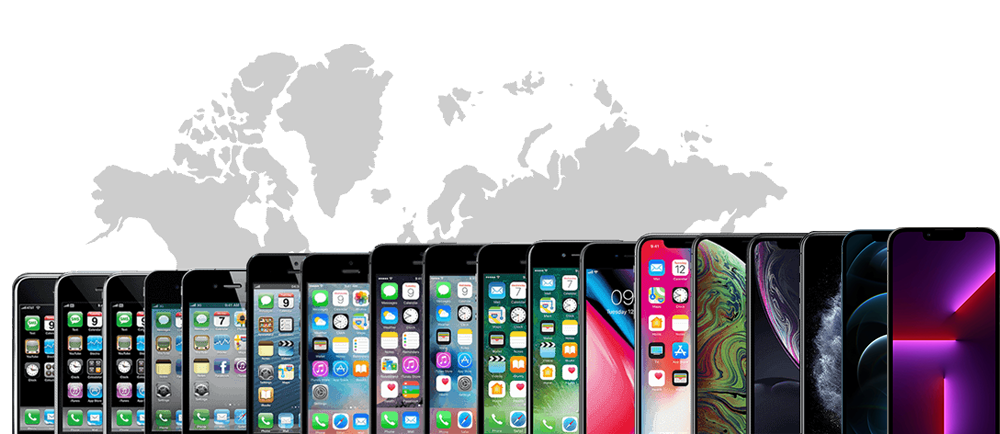
iPhone Evolution Timeline 2007-2023 iOS Evolution


When Steve Jobs introduced the first iPhone in 2007, he promised to revolutionize the way we communicate and access information. Little did he know that he was about to change the world forever. Since then, Apple has released more than a dozen iPhone models, each one more innovative and sophisticated than the last. In this blog post, we will take a trip down memory lane and explore the fascinating history of the iPhone.


When was the first iPhone released?


The First Generation iPhone:

The First Generation iPhone

The first iPhone was released on June 29, 2007, and it was an instant hit. It featured a 3.5-inch display with a resolution of 320 x 480 pixels, a 2-megapixel camera, and 4GB or 8GB of storage. It ran on iOS 1.0, which was a modified version of the Mac OS X operating system. The original iPhone lacked some of the features that we now take for granted, such as copy and paste, push email, and third-party apps, but it set the standard for all future smartphones.


The iPhone 3G:

The_iPhone_3G

The iPhone 3G was released on July 11, 2008, and it was the first iPhone to support 3G networks. It also had a plastic back, which was a departure from the metal back of the original iPhone. The iPhone 3G featured a 3.5-inch display with a resolution of 320 x 480 pixels, a 2-megapixel camera, and up to 16GB of storage. It ran on iOS 2.0, which introduced support for third-party apps and push email.


The iPhone 3GS:

The_iPhone_3GS

The iPhone 3GS was released on June 19, 2009, and it was the first iPhone to feature a video camera. It also had a faster processor and more RAM than its predecessors. The iPhone 3GS featured a 3.5-inch display with a resolution of 320 x 480 pixels, a 3-megapixel camera, and up to 32GB of storage. It ran on iOS 3.0, which introduced features such as voice control and a landscape keyboard.


The iPhone 4:

The_iPhone_4

The iPhone 4 was released on June 24, 2010, and it was a major redesign of the iPhone. It featured a sleek new glass and stainless steel body, a retina display with a resolution of 640 x 960 pixels, and a front-facing camera for FaceTime video calls. The iPhone 4 also had a faster processor and more RAM than its predecessors. It ran on iOS 4.0, which introduced features such as multitasking and folders.


The iPhone 4S:

The_iPhone_4S

The iPhone 4S was released on October 14, 2011, and it was the first iPhone to feature Siri. The iPhone 4S had the same design as its predecessor, but it featured a faster processor, more RAM, and a better camera. It also introduced Siri, the voice-activated personal assistant that could perform a wide range of tasks, such as sending texts, making calls, and setting reminders. The iPhone 4S featured a 3.5-inch display with a resolution of 640 x 960 pixels, an 8-megapixel camera, and up to 64GB of storage. It ran on iOS 5.0, which introduced features such as iMessage and iCloud.


The iPhone 5:

The_iPhone_5

The iPhone 5 was released on September 21, 2012, and it was the first iPhone to feature a larger 4-inch display with a resolution of 640 x 1136 pixels. It also had a thinner and lighter design, with an aluminum body and glass back. The iPhone 5 featured a faster processor, more RAM, and a better camera than its predecessors. It ran on iOS 6.0, which introduced features such as Apple Maps and Passbook.


The iPhone 5c:

The_iPhone_5C

The iPhone 5c was released on September 20, 2013, and it was a more affordable version of the iPhone 5. It featured a plastic body in a range of bright colors, and it had the same specs as the iPhone 5. The iPhone 5c featured a 4-inch display with a resolution of 640 x 1136 pixels, an 8-megapixel camera, and up to 32GB of storage. It ran on iOS 7.0, which introduced a new design and features such as Control Center and AirDrop.


The iPhone 5s:

The_iPhone_5S

The iPhone 5s was released on September 20, 2013, and it was the first iPhone to feature Touch ID, the fingerprint scanner that could be used to unlock the device and make purchases. It also had a faster processor and more RAM than its predecessors. The iPhone 5s featured a 4-inch display with a resolution of 640 x 1136 pixels, an 8-megapixel camera, and up to 64GB of storage. It ran on iOS 7.0, which introduced new features such as Siri enhancements and a new camera app.


The iPhone 6 and 6 Plus:

The_iPhone_6_and_6Plus

The iPhone 6 and 6 Plus were released on September 19, 2014, and they featured larger 4.7-inch and 5.5-inch displays, respectively. They also had a thinner and lighter design, with rounded edges and an aluminum body. The iPhone 6 and 6 Plus featured a faster processor, more RAM, and a better camera than their predecessors. They ran on iOS 8.0, which introduced features such as HealthKit and Continuity.


The iPhone 6s and 6s Plus:

The_iPhone_6s_and_6s_Plus

The iPhone 6s and 6s Plus were released on September 25, 2015, and they were the first iPhones to feature 3D Touch, a pressure-sensitive display that could recognize different levels of pressure. They also had a faster processor and more RAM than their predecessors. The iPhone 6s and 6s Plus featured a 4.7-inch and 5.5-inch display, respectively, with a resolution of 750 x 1334 pixels and 1080 x 1920 pixels. They also had an improved 12-megapixel camera and up to 128GB of storage. They ran on iOS 9.0, which introduced features such as Apple Music and improved Siri capabilities.


The iPhone SE:

The_iPhone_SE_2016

The iPhone SE was released on March 31, 2016, and it was a more affordable iPhone that featured the same design as the iPhone 5s but with improved specs. It had a 4-inch display with a resolution of 640 x 1136 pixels, an improved 12-megapixel camera, and up to 128GB of storage. It ran on iOS 9.3, which introduced features such as Night Shift and password-protected notes.


The iPhone 7 and 7 Plus:

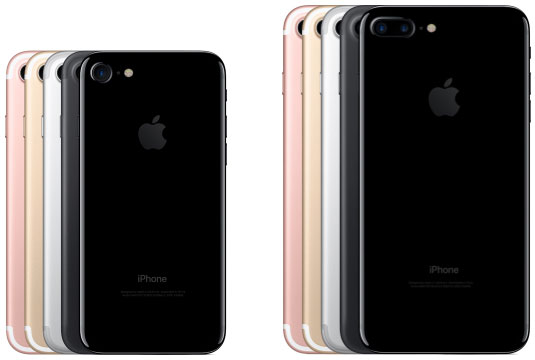
iPhone_7_and_7_Plus

The iPhone 7 and 7 Plus were released on September 16, 2016, and they were the first iPhones to feature water resistance and a new pressure-sensitive home button. The iPhone 7 featured a 4.7-inch display with a resolution of 750 x 1334 pixels, while the iPhone 7 Plus had a 5.5-inch display with a resolution of 1080 x 1920 pixels. Both phones featured a new A10 Fusion chip, an improved 12-megapixel camera, and up to 256GB of storage. They ran on iOS 10, which introduced features such as a redesigned Messages app and a new Home app for smart home devices.


The iPhone 8 and 8 Plus:

iPhone_8_and_8_Plus

The iPhone 8 and 8 Plus were released on September 22, 2017, and they featured a glass back design that allowed for wireless charging. The iPhone 8 had a 4.7-inch display with a resolution of 750 x 1334 pixels, while the iPhone 8 Plus had a 5.5-inch display with a resolution of 1080 x 1920 pixels. Both phones featured an improved A11 Bionic chip, an improved 12-megapixel camera, and up to 256GB of storage. They ran on iOS 11, which introduced features such as a redesigned App Store and a new Control Center.


The iPhone X:

iPhone_X

The iPhone X was released on November 3, 2017, and it featured a new design with an edge-to-edge display and no home button. It also introduced Face ID, a facial recognition system that could be used to unlock the device and make purchases. The iPhone X had a 5.8-inch display with a resolution of 1125 x 2436 pixels, an improved A11 Bionic chip, and up to 256GB of storage. It ran on iOS 11, which introduced features such as Animoji and augmented reality capabilities.


The iPhone XS and XS Max:

iPhone_XS_and_XS_Max

The iPhone XS and XS Max were released on September 21, 2018, and they were an updated version of the iPhone X. The iPhone XS had a 5.8-inch display with a resolution of 1125 x 2436 pixels, while the iPhone XS Max had a larger 6.5-inch display with a resolution of 1242 x 2688 pixels. Both phones featured an improved A12 Bionic chip, an improved 12-megapixel camera, and up to 512GB of storage. They ran on iOS 12, which introduced features such as Screen Time and Group FaceTime.


The iPhone XR:

iPhone_XR

The iPhone XR was released on October 26, 2018, and it was a more affordable version of the iPhone XS with a few differences in design and specs. The iPhone XR featured a 6.1-inch display with a resolution of 828 x 1792 pixels, a single-lens 12-megapixel camera, and up to 256GB of storage. It also featured the same A12 Bionic chip as the iPhone XS and ran on iOS 12.


The iPhone 11, 11 Pro, and 11 Pro Max:

iPhone_11_11_Pro_and_11_Pro_Max


The iPhone 11, 11 Pro, and 11 Pro Max were released on September 20, 2019, and they featured improved cameras and faster processors. The iPhone 11 had a 6.1-inch display with a resolution of 828 x 1792 pixels, while the iPhone 11 Pro had a 5.8-inch display with a resolution of 1125 x 2436 pixels, and the iPhone 11 Pro Max had a 6.5-inch display with a resolution of 1242 x 2688 pixels. All three phones featured the A13 Bionic chip, a dual-lens 12-megapixel camera system, and up to 512GB of storage. They ran on iOS 13, which introduced features such as Dark Mode and a redesigned Photos app.


The iPhone SE (2nd generation):

The_iPhone_SE_2nd_generation

The iPhone SE (2nd generation) was released on April 24, 2020, and it was another more affordable iPhone that featured the same design as the iPhone 8 but with improved specs. It had a 4.7-inch display with a resolution of 750 x 1334 pixels, an improved A13 Bionic chip, an improved 12-megapixel camera, and up to 256GB of storage. It ran on iOS 13 and later versions.


The iPhone 12, 12 Pro, 12 Pro Max, and 12 Mini:

iPhone_12_12_Pro_12_Pro_Max_and_12_Mini

The iPhone 12, 12 Pro, 12 Pro Max, and 12 Mini were released on October 23, 2020, and they featured a new design with a flat-edge design and 5G capabilities. The iPhone 12 had a 6.1-inch display with a resolution of 1170 x 2532 pixels, while the iPhone 12 Pro had the same display but with additional camera features. The iPhone 12 Pro Max had a larger 6.7-inch display with a resolution of 1284 x 2778 pixels, while the iPhone 12 Mini had a smaller 5.4-inch display with a resolution of 1080 x 2340 pixels. All four phones featured the A14 Bionic chip, a dual-lens 12-megapixel camera system (triple-lens on the Pro models), and up to 512GB of storage. They ran on iOS 14, which introduced features such as App Clips and improved privacy controls.


The iPhone 13, 13 Mini, 13 Pro, and 13 Pro Max:

iPhone_13_13 Mini_13_Pro_and_13_Pro_Max

The latest iPhones were announced on September 14, 2021, and are set to be released on September 24, 2021. The iPhone 13 and 13 Mini feature a 6.1-inch and 5.4-inch display, respectively, with a resolution of 1170 x 2532 pixels for the iPhone 13 and 1080 x 2340 pixels for the iPhone 13 Mini. The iPhone 13 Pro and 13 Pro Max have a 6.1-inch and 6.7-inch display, respectively, with a resolution of 1170 x 2532 pixels and 1284 x 2778 pixels, respectively. All four phones feature the new A15 Bionic chip, a dual-lens camera system for the iPhone 13 and 13 Mini, and a triple-lens camera system for the iPhone 13 Pro and 13 Pro Max, and up to 1TB of storage. They will run on iOS 15, which introduces features such as improved FaceTime, new Maps features, and improved privacy controls.


What is the latest iPhone release and when is it set to be released?

The iPhone 14, iPhone 14 Plus, iPhone 14 Pro, and iPhone 14 Pro Max

Apple-iPhone-14-Pro-iPhone-14-Pro-Max-Dynamic-Island-

The iPhone 14 is Apple's latest flagship smartphone, and it's available in four different versions: the iPhone 14, iPhone 14 Plus, iPhone 14 Pro, and iPhone 14 Pro Max. All four models feature a new design with flat edges, an upgraded A16 Bionic chip, and improved cameras.

The iPhone 14 and iPhone 14 Plus are the more affordable models in the lineup, and they feature a 6.1-inch and 6.7-inch display, respectively. Both models have an OLED display with a resolution of 2532 x 1170 pixels. The iPhone 14 is powered by an A16 Bionic chip with 4GB of RAM, while the iPhone 14 Plus is powered by an A16 Bionic chip with 6GB of RAM.

The iPhone 14 and iPhone 14 Plus have a dual-camera system on the back, consisting of a 12-megapixel wide-angle lens and a 12-megapixel ultrawide-angle lens. The front-facing camera is a 12-megapixel TrueDepth camera.

The iPhone 14 Pro and iPhone 14 Pro Max are the more premium models in the lineup, and they feature a number of upgrades over the iPhone 14 and iPhone 14 Plus. The iPhone 14 Pro and iPhone 14 Pro Max have a 6.1-inch and 6.7-inch display, respectively, with a resolution of 2532 x 1170 pixels. Both models have an OLED display with ProMotion support, which allows for a variable refresh rate of up to 120Hz. The iPhone 14 Pro and iPhone 14 Pro Max are powered by an A16 Bionic chip with 6GB of RAM.

The iPhone 14 Pro and iPhone 14 Pro Max have a triple-camera system on the back, consisting of a 12-megapixel wide-angle lens, a 12-megapixel ultrawide-angle lens, and a 12-megapixel telephoto lens. The front-facing camera is a 12-megapixel TrueDepth camera.

All four models of the iPhone 14 are available in a variety of colors, including Midnight, Starlight, Product Red, Blue, and Pink. The iPhone 14 and iPhone 14 Plus start at $699 and $799, respectively, while the iPhone 14 Pro and iPhone 14 Pro Max start at $999 and $1,099, respectively.

So, which iPhone 14 model is right for you? If you're looking for an affordable smartphone with a great display and camera, the iPhone 14 or iPhone 14 Plus is a great option. If you're looking for a more premium smartphone with a faster processor, a better display, and a more advanced camera system, the iPhone 14 Pro or iPhone 14 Pro Max is the way to go.

The history of the iPhone is a story of innovation and technological advancements. From its first release in 2007, the iPhone has evolved and improved with each new version, introducing new features and capabilities that have changed the way we communicate and use our mobile devices. With the latest release of the iPhone 13, we can only imagine what the future holds for this iconic device.


Share:

Wednesday, October 12, 2022

الديسلكسيا أو عُسر القراءة


الديسلكسيا أو عُسر القراءة واحد من اضطرابات التعلم، لأن اللي بيعاني منه بيبقى عنده مشاكل في التعرف على أصوات الكلام ومعرفة مدى صلتها بالحروف والكلمات (تفكيك رموزها). وبيحصل بسبب فروق فردية في مناطق الدماغ المسؤولة عن معالجة اللغة. كمان في الغالب الموضوع متوارث، وفيه أبحاث ربطت بينه وبين جينات معينة بتؤثر على كيفية معالجة المخ للقراءة واللغة.


عُسر القراءة مالوش علاقة بالذكاء أو السمع أو البصر. وغالبية الأطفال المصابين بيه ناجحين في دراستهم خصوصًا لو بيدروسوا من خلال برامج تعليمية خاصة، ده غير طبعًا أن الدعم المعنوي مهم قوي في تحسين أداء المصاب بيه.
عُسر القراءة مالوش علاج، لكن الاكتشاف المبكر ممكن يساعد جدًا في التحكم فيه. كمان وارد أنك متكتشفوش بدري، لكن ممكن تتعامل معاه في أي مرحلة.

أعراض الديسلكسيا أو عُسر القراءة:

قبل الدراسة

  • التأخر في الكلام
  • تعلّم الكلمات الجديدة ببطء
  • مشاكل في تكوين الكلمات بشكل صحيح، زي عكس ترتيب الأصوات في الكلمات أو الخلط بين الكلمات المتشابهة
  • مشاكل في تذكر الحروف والأرقام والألوان أو تسميتها
  • صعوبة في تعلّم أغاني الأطفال

وقت الدراسة

غالبًا الأعراض دي بتظهر لما الطفل يبدأ يروح المدرسة:
  • القدرة على القراءة أقل من عمر الطفل
  • قدرته على حل المشاكل أو فهم اللي بيسمعه.
  • مبيبقاش قادر على التعبير بالكلمات الصحيحة في بعض الأوقات
  • مبيعرفش يكون إجابات الأسئلة
  • صعوبة في تذكر التسلسل.
  • صعوبة في رؤية (وأوقات في سماع) أوجه التشابه والاختلاف في الحروف والكلمات
  • صعوبة في نطق الكلمات غير المألوفة
  • صعوبة البلع
  • بيقضي وقت أطول في إكمال المهام اللي فيها قراءة و كتابة، وده بيخليه يبعد عنها.

كمان في مرحلة المراهقة:

  • بيبقى فيه صعوبة في القراءة بصوت عالي
  • بطء في القراءة والكتابة
  • مشكلات في التهجي
  • صعوبة في تلخيص القصص
  • صعوبة في تعلم لغة تانية
  • صعوبة في حل مسائل الرياضيات اللفظية

طبعًا الديسلكسيا أو عُسر القراءة بيصاحبها لمضاعفات:

  • صعوبة في التعلم.
  • مشاكل اجتماعية، خاصة بالتواصل وممكن تؤثر على تفاعله وعلاقاته على المدى الطويل
  • عدم الوصول للمستوى في كل مرحلة عمرية.
  • فرصة الإصابة بالـ ADHD أعلى، بل والعكس، يعني ممكن المصاب بـ ADHD يصاب بعسر القراءة.


العلاج أو خلينا نقول التحكم في الحالة دي، بيعتمد بشكل أساسي على البرنامج التعليمي والدعم النفسي. وفيه تقنيات علمية مصممة مخصوص للتعامل مع عسر القراءة أو الديسلكسيا.


لو اللي بيقرا الكلام ده أب أو أم، فياريت تبدؤوا معاهم من بدري وبمجرد ما تحسوا أو تشوفوا أي من العلامات والأعراض اللي قولتها، لأن كل ما هتتعاملوا مع الموضوع بدري، كل ما هيبقى فيه تحسن بدري.
كمان القراءة اليومية للطفل بصوت عالي مفيدة جدا، وياريت قريتوا مع تتبع كل كلمة بالصباع، يعني كل كلمة تشاوروا عليها وتقولولها بصوت عالي. وطبعًا الكتب الصوتية حل كويس جدًا.

ومهم قوي تقليل وقت الشاشة جدًا.

لكن الأهم… الصبر والتكرار وعدم إظهار أي ضجر أو زهق، بالعكس، لازم الجلسة دي تكون مريحة وFUN عشان الطفل يبقى مستنيها كل يوم.
بس فيه حاجة… لازم تتأكدوا أن الموضوع مالوش أسباب تانية، زي البصر والسمع أو اضطراب ما في المخ أو الجهاز العصبي، أو حتى مشاكل في سلوك الطفل. عشان تبقوا متأكدين أنكوا شغالين في الطريق الصحيح.

وأخيرًا أرشحلكوا الكتاب ده جدًا

This is Dyslexia: The definitive guide to the untapped power of dyslexic thinking and its vital role in our future Paperback – 7 Oct. 2021

متوفر على أمازون من هنــــــــــا


لو عجبك المحتوى واستفادت منه، تقدر تتابعني على تويتر @_WalidTaha أو تشترك في قناتي على يوتويب أو في النشرة البريدية الجميلة 😎 ميكانيكي بني آدمين.


Share:

Tuesday, October 11, 2022

الفشل الوسطي الجميل!


كيف تتغلب على الفشل


حاولت أعد المرات اللي "فشلت" فيها معرفتش، لكن في المقابل الخبرة واللي اتعلمته من المواقف دي معرفش أقدره بفلوس.

وده اللي عايز أكلمك فيه النهاردة...  👇

الفشل خطوة وجزء من رحلتك وهو اللي هيعلمك تحسبها ازاي.

الإحباط طبيعي عشان أنت بني آدم، متتجاهلوش، بس حاول تتخطاه بالبحث في أسبابه ومعالجتها.

الإحباط كان من أكتر الحاجات اللي معطلاني من 15-16 سنة، لكن لما قررت أتغير، دورت على أسبابه واشتغلت عليها، وكل مرة يجيلي الإحساس ده مبفكرش في "أنا محبط"، لكن بفكر في "أنا ليه محبط"؟


الخوف مش موجود عشان يخليك تنعزل ويمنعك من الحاجات اللي عايز تحققها، لكنه موجود عشان تدرس وتحضر نفسك وتخطط لكل خطوة.

لو كنت خوفت من كل خطوة هعملها مكنتش اتحركت من مكاني خالص، ولا سافرت ولا خاطرت بتغيير المسار الوظيفي ولا عملت أي حاجة.


التردد مش عيب "لو مش عادة"، طول ما أنت مغطي كل الجوانب المهمة للحاجة اللي عايز تعملها، يبقى اتكل على الله وأبدأ.

عايز أقولك أني كنت متردد جدًا زيك بالظبط، لكن بدأت أحاول أخد قرارات "حاسمة" في مواقف صغيرة، ولو حتى هلبس إيه أو هاكل إيه أو هروح فين أو هذاكر إيه، أو هشتغل فين أو هشارك مين.


قلل اختيارات... كتر قرارات! | فلوج 3 من إنجلترا


لازم تبقى فاهم أن الوقت المناسب للبداية مش هييجي لو بدأتش، وانسب وقت ليك هو الوقت اللي هتبدأ فيه.

أنا عيشت سنين أقول "لسه مش وقته" لحاجات كتير، لكن لما بدأت أنفذ، اكتشفت أني تأخرت بسبب انتظاري.


مفيش حاجة اسمها شغف، وحبك للحاجة أنت اللي بتعمله لما بتبدأ وتستمر وتنتظم!

ومفيش حاجة هتجيلك عشان فكرت فيها ولا عشان الشاكرا سالكة مثلًا.


مفيش حاجة بالحب ولا بالتمني، ده شغل دورات وكتب مسغانمي... مش واقع!

حبك للي بتعمله بييجي مع التدريب والاستمرارية والإصرار على تعلم ومعرفة كل حاجة عن الحاجة اللي عايز تعملها.


نصيحة من واحد جاي من المستقبل، الشغف ورئع التنمية البشرية مبيأكلش عيش.

الوقت متأخرش... عشان طول ما أنت عايش يبقى عندك وقت.


أنا بدأت 31 سنة والنهاردة 45 سنة ولسه بتعلم، عشان مقتنع بأن طول ما إحنا عايشين... يبقى عندنا وقت.

لا العيال ولا الوقت ولا الفلوس حجج كافية عشان متعملش، نص ساعة أو ساعة في اليوم، مش هتؤثر بالسلب عليك زي ما أنت فاكر... بالعكس!!


متفكرش في اللي هيقول هيقول إيه، ولا هيبصولك إزاي... النهاردة بيقطعوا حبالك،  وبكرة لما تحقق حاجة هيصقفولك.

هما هيقولوا في كل الأحوال فمتخليش حد يعرف شخصيتك بالنيابة عنك.


ياما سمعت من اللي حواليا كلام حرفيا "سم" لكن عملت نفسي مش موجود وكملت.


استمر... الندم الحقيقي مبيبقاش على اللي عملته وجربته وفشل، لكن على اللي معملتوش ومجربتوش.


لو عجبك المحتوى واستفادت منه، تقدر تتابعني على تويتر @_WalidTaha أو تشترك في قناتي على يوتويب أو في النشرة البريدية الجميلة 😎 ميكانيكي بني آدمين.


Share:

الكتابة لتجربة المستخدم UX Writng


  ✍️الكتابة لتجربة المستخدم أو الـUXWriting من المجالات المطلوبة قوي النهاردة، ومع ذلك معرفتنا بيها قليلة جدًا، عشان محدش عارف أو فاهم بالظبط هي إيه، فأنا هقولك وهرشحلك مصادر تتعلم منها... 

يعني إيه الكتابة لتجربة المستخدم أو UX Writing؟

 واحد من مجالات الكتابة اللي بيهتم بصياغة وكتابة النصوص اللي بيتعامل ويتفاعل  معاها المستخدم في تقريبًا كل حاجة.
بداية من التليفون اللي في إيدك، لغاية النصوص اللي بتشوفها في الـ ATM ولوحة العربية بتاعتك.  

يعني  نظم تشغيل ماشي، تطبيقات مفيش مشاكل، مواقع يالا بينا، ألعاب وليه لأ... بص... حرفيًا أي حاجة بتستخدمها النهاردة بسهولة فالسهولة دي جاية من فريق كتب نصوص واستخدم أيقونات سهلت عليك الاستخدام. 

زي إيه برضه؟! 👇

  • النصوص المُصغرة أو الـ Microscopy 
  • الإرشادات وتعليمات الاستخدام.
  • نصوص الأزرار.
  • رسائل التأكيد.
  • الـ CTA Hأو الدعوة لاتخاذ إجراء.
  • الإشعارات والتنبيهات.

وكل حاجة بقى على الوزن ده 👇

وده يفرق إيه عن كتبة المحتوى الإعلاني Copywriting؟

الفرق أنك في التسويق والـ، Copywriting بتكتب عشان تحقق أهداف الشركة اللي زي البيع مثلا، لكن في حالة الكتابة لتجربة المستخدم فأنت بتكتب للمستخدم...
عشان حاسس بيه وعارف اهتمامته.
عشان متعاطف معاه وحاطط نفسك مكانه.

زي مثال كنت سمعته في بودكاست من فترة...

لما بتبقى في المطار بيبقى كل همك تاخد الـboardingpass وتعدي من الجوازات وتخلص. لكن تلاقي بعض الشركات تديلك 20 فلاير فيهم معلومات متهمكش خالص في اللحظة دي، لأن كل اللي أنت عايزه أنك تعرف بوابة كام، ومش مهتم بالأميال والبتاع. 

طبعا الموضوع مش بالبساطة دي خالص، لأن اختيار غلط لكلمة أو جملة، ممكن جدا يكلفك البزنس بتاعك.

لذلك عملت حلقة كاملة عن الموضوع هتلاقيها في التويت الجاية، وفي التويت اللي بعدها هرشحلك المكان العربي الوحيد اللي هيخليك من طلائع الالمجال ده في المنطقة. 👇 

ما هي الكتابة لتجربة المستخدم UX WRITING | واحد من أهم مجالات الكتابة في 2022


كمان منصة UX Writing بالعربية، هي أفضل مكان ممكن تتعلم منه.
ومش بس من الكورسات المدفوعة، لكن بالنسبة لي ... الحساب على تويتر والمدونة بتاعتهم، فيهم محتوى قوي جدا وهينفع أي حد بيبدا

ده حسابهم @UXWritingar


*أنا ما أخدتش أي من كورساتهم، لكن آراء الناس على الموقع عظيمة جدا

لو عجبك المحتوى واستفادت منه، تقدر تتابعني على تويتر @_WalidTaha أو تشترك في قناتي على يوتويب أو في النشرة البريدية الجميلة 😎 ميكانيكي بني آدمين.


Share:

Monday, March 14, 2022

التحدي والحرب...

 
العلاقة بين الموظف والمدير - مدونة وليد طه

التحدي والحرب! 

قريت الصبح بوست على جروب ملخصه "مدير المشروع مشاني ووقف مستحقاتي وبيطفي سجاير في صوابعي عشان أخدت أجازة من حقي ولظرف مهم جدًا".

من كام سنة كده كنت شغال Sales في مجلة، والمدير بتاعي من غير سبب شالني من الإعلانات اللي بتجيب فلوس وحطني في حاجة تانية مرهقة جدًا  عشان هو ياخد الحسابات بتاعتي ويجبرني أمشي لأن شكله بقى وحش.

من كام سنة برضه لما اشتغلت في جريدة الحياة، كان كل فرد من أول رئيس التحرير -اللي مكنتش بحبه- لغاية أجدد محرر- اللي هو أقدم مني لأني كنت متدرب- بيساعدونا في كل حاجة، وممكن يقعد معاك يشرحلك ويحلل مقال أو خبر وإزاي اتكتب وليه.

بعدها وفي شركة تانية، اشتغلت مع أحسن ٢ مديرين في حياتي ، ومع أنهم كانوا فعلًا  مبيعجبهمش العجب، بس برضه بيعلموني ويدوني حاجات هدفها أتطور في شغلي، مش أفشل، وكل شهر مر عليا في الشركة دي كنت بحس بالتغيير والتطور فعلًا.

فيه كتير بيخلطوا بين تحدي قدرات الموظف وبين تحدي الموظف نفسه، أو بمعنى أصح "إعلان الحرب عليه".


في شغل قريب قوي، الشركة بتديك KPIs عالي، بس في نفس الوقت بتعمل كل حاجة في مقدرتها عشان أنت تحقق الـ KPIs دي، والمدير من الناس اللي تحب ترغي معاهم في المطلق كده، لأن مفيش خطوة بتاخدها إلا ومعاك… طالما هتنفعك يبقى يالا بينا.

تحدي القدرات مينفعش ييجي من غير دعم كامل وتسخير لوقتك عشان تساعد الموظف يتطور ويكون أحسن، عشانك قبل أي حد، وعمره ما يكون بالتقليل منه ولا بالسخرية ولا باستعباده.

لغاية النهاردة وبعد رحلة شغل بقالها ٢٧ سنة، مقابلتش غير ٣ عرب كويسين والباقي كله ميتقلعش، متخيل؟ 


من يومين كده اتعلمت كلمة جديدة  وهي legislate  

دينزل واشنطن استخدمها في حوار لما اتسأل عن المشاكل اللي بين كل عرق وإزاي تتحل، ودور الحكومة، فكان رده You Can’t Legislate Love, it’s up to us، قصده البني آدمين نفسهم "الشعب".

By GabboT - The Equalizer 08, CC BY-SA 2.0, https://commons.wikimedia.org/w/index.php?curid=35547275


محدش يقدر يحط قانون تعايش وتجبر الكل يمشوا عليه، لأنها مبتمشيش كده، لكن بالتعليم والثقافة اللي بيبنوا طرق نقدر نتفاهم ونتكلم ونتعايش من خلالها، مهما اختلف اللون أو العرق أو العقيدة أو المنصب!

يمكن تقول ده كلام مثالي، لكن الحقيقة أنه متحقق بين ناس كتير، وفيه ماشيين عليه وناجحين أكتر بكتير من اللي قرروا يحاربوا الموظفين.

القوانين موجودة… المهم اللي المفروض ينفذوها، ماشيين عليها ولا لأ!


إقرا كمان: بعد ما تترفد


Share:

Thursday, March 10, 2022

تطبيق "دوّن"... حل جديد لتنظيم التدوينات والملاحظات


تطبيق دون لكتابة التدوينات وتنظيمها والربط بينها


كنت اتكلمت قبل كده عن تطبيق Day One، وأهميته وإزاي استفادت منه جدًا في شغلي وفي حياتي عمومًا، وده للي ميعرفش، هو تطبيق خاص بالتدوين وكتابة اليوميات الشخصية، وجامد جدًا الحقيقة وأنصح بيه. يعني تقدر تكتب شغلك عليه أو تكتب يوميات شخصية ببساطة وتضيف صور وحتى ملاحظات صوتية، والتطبيق بيعمل تبويب للي بتكتبه بالتاريخ والساعة.

تطبيق Day One للتدوين وكتابة اليوميات الشخصية


بس غير مجاني وبالإنجليزي وعلى iOS بس...

والحقيقة جالتي وقتها فكرة عمل تطبيق شبيه ليه بالعربي ويكون غير مدفوع ومتاح لكل الناس، وفعلا عملت شوية بحث، لغاية ما وصلت لتطبيق عربي بنفس الفكرة بالظبط واستخدامه سهل جدا، وحتى عاملك تقسيمة تساعدك في التدوين.... وفوق كل ده مجاني وبيشتغل على أندرويد وiOS، لكن مش متاح على أجهزة الكومبيوتر زي Day One!

تطبيق "دوّن" من الحاجات اللي خلاص بقت جزء من يومي، ومبقولش أنه التطبيق الوحيد، أنا لسه معتمد على Day One بشكل كبير، لكنه بقى واحد من الأدوات اللي بعتمد عليها، لأني بكتب كتير قوي وأي فكرة بروح جري أكتب نبذة عنها عشان أرجعلها بعدين، وأفضل حاجة أنه متاح على النظامية زي ما قولت Android وiOS، فلو بدأت تدوينة على آيفون أقدر أكملها على جوجل بكسل والحياة جميلة.

تطبيق دون للملاحظات والتدوين باللغة العربية


هتقولي فيه تطبيق الـ Notes أو أي حاجة تانية شبيهة بيه وممكن أعمل نفس الكلام بالظبط، هقولك جرب وهتشوف بنفسك الاختلاف، وخصوصًا أنه تطبيق "عربي"، يعني واجهة استخدام عربية وبيتعامل مع اللغة كويس قوي.


تطبيق دون هيفيدك في حاجات كتير:

1- هتقدر تعمل تدوينتك كاملة قبل النشر، يعني نص وصورة .

2- هتعمل تصنيفات للتدوينات بحسب المصدر أو التخصص، ولو بتاخد ملاحظة عن كتاب أو عايز تكتب فكرة مثلا، هتلاقي أماكن تكتب فيها اسم الكتاب والصفحة والباب عشان تقدر ترجعلها في أي وقت بسهولة، وكمان تقدر تضيف تخصص بنفسك، لو التخصص مش موجود على تطبيق دون.

3- التصنيف ده هيسهل عليك التصفح جدًا، فلما تحاول ترجع للي كتبته، مش هتبذل جهد كبير في البحث.

4- فيه ميزة في التطبيق وهي "تصميم المدونة"، الحقيقة مجربتهاش لسه، بس شكلها كويس، ودي تقدر عليها تصمم التدوينة وتنشرها على المنصة اللي عايزها.


الملاحظة الوحيدة على التطبيق هو أن تجربة القراءة في الوضع الليلي على آيفون صعبة جدًا، يعني خلفية رمادي غامق وكتابة رمادي أفتح سيكا، فالدنيا سايحة في بعضها، وخصوصًا عند الناس اللي لابسين نضارات زي.

كمان لو لغيت الوضع الليلي وجيت تبحث في خانة التخصص، فخلفية خانة البحث لونها أبيض والنص اللي بتكتبه Guess what... لونه أبيض برضه، فطبعًا حاجة زي الفل.


ترشيحات:

 مفيش حاجة ممكن تحل مكان البني آدم!


Share: